[M4 Pro Mac] vLLM 설치 및 실행 (Metal 가속)
AI2026. 3. 2. 22:53
vllm-metal을 통해 M4 Pro에서 Llama 3.1 같은 모델을 네이티브로 돌리는 방법을 정리합니다.
2. vllm-metal 설치 (공식 스크립트)
Apple Silicon 전용으로 최적화된 vLLM 환경을 구축합니다. 아래 명령어로 전용 가상 환경(.venv-vllm-metal)을 한 번에 생성하고 필수 패키지를 설치할 수 있습니다.
Bash
curl -fsSL https://raw.githubusercontent.com/vllm-project/vllm-metal/main/install.sh | bash
3. 편리한 환경 설정을 위한 'Alias' 등록
가상 환경 경로가 길기 때문에, 언제든 쉽게 활성화할 수 있도록 별칭(Alias)을 설정하는 것이 꿀팁입니다.
- ~/.zshrc 파일을 열고 아래 내용을 추가합니다.
-
Bash
# vLLM 가상환경 활성화 별칭 (avv: Activate Vllm Venv) alias avv="source ~/.venv-vllm-metal/bin/activate" - 적용: source ~/.zshrc
- 이제 터미널에 **avv**만 치면 바로 vLLM 환경으로 진입합니다!
4. 모델 실행하기 (Llama 3.1 8B)
M4 Pro의 GPU 성능을 활용해 4비트 양자화 모델을 실행해 봅시다. mlx-community에서 제공하는 모델이 Mac에서 가장 속도가 잘 나옵니다.
Bash
vllm serve "mlx-community/Meta-Llama-3.1-8B-Instruct-4bit" --gpu-memory-utilization 0.9
5. 트러블슈팅: "Address already in use" 에러
실행 중 OSError: [Errno 48] Address already in use가 뜬다면, 이전 프로세스가 8000번 포트를 잡고 있는 것입니다.
- 해결법 1 (포트 청소):
-
Bash
lsof -ti :8000 | xargs kill -9 - 해결법 2 (포트 변경):
-
Bash
vllm serve ... --port 8001
curl http://localhost:8000/v1/chat/completions \
-H "Content-Type: application/json" \
-d '{
"model": "mlx-community/Meta-Llama-3.1-8B-Instruct-4bit",
"messages": [
{"role": "system", "content": "너는 유능한 AI 어시스턴트야."},
{"role": "user", "content": "M4 Pro 맥북의 장점이 뭐야?"}
],
"max_tokens": 200
}'
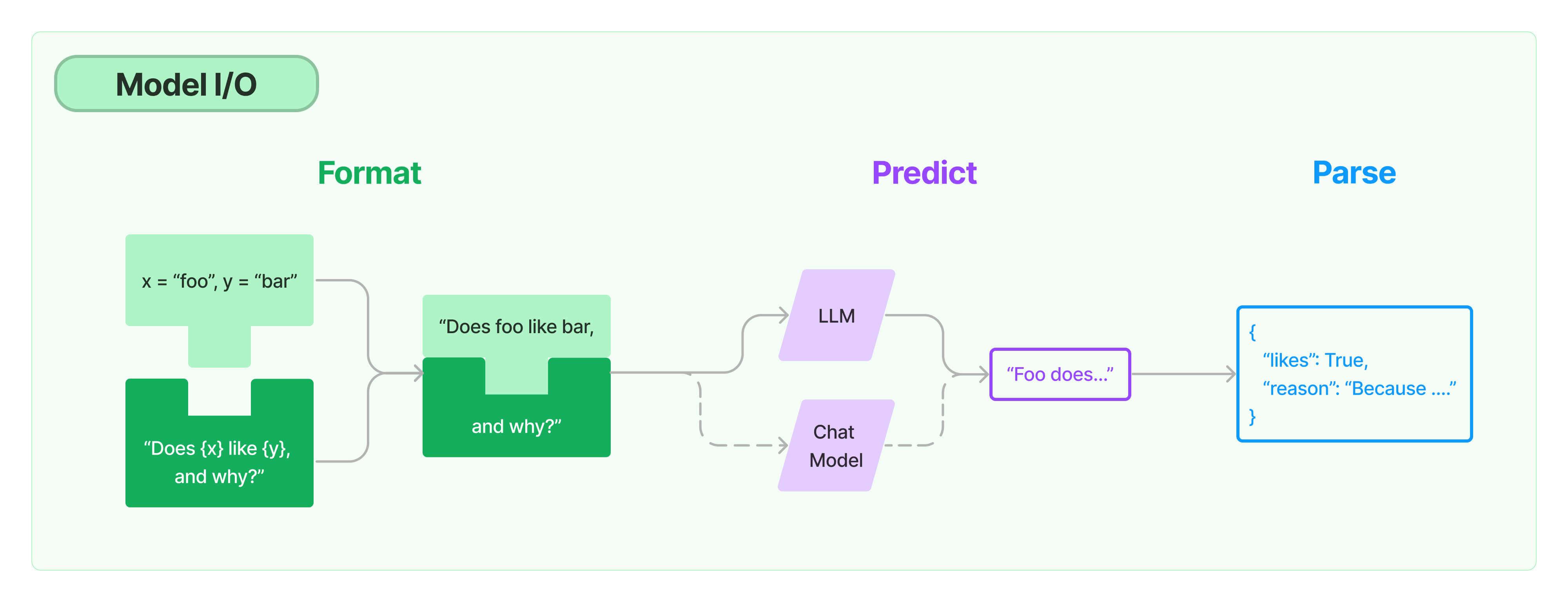
{"id":"chatcmpl-97188a8eb447d39c","object":"chat.completion","created":1772460137,"model":"mlx-community/Meta-Llama-3.1-8B-Instruct-4bit","choices":[{"index":0,"message":{"role":"assistant","content":"M1, M1 Pro, M1 Max, M1 Ultra, M2, M2 Pro, M2 Max, M2 Ultra тощо 많은 M 아이);}.series가 출시되었는데, M4 Pro MacBook의 정보는 찾을 수 없지ONGinely.\n\n\n\n그러나 M1, M1 Pro, M1 Max, M2, M2 Pro, M2 Max, M2 Ultra 등을 예로 들면, \n\n맥북 M1 프로의 장점은 다음과 같습니다.\n\n* 저전력이었으며于是 시작 제한 {});\n* 컨텍처서 게 네행성어S (Design)를 PRO말로 같은 수 있다@bl witnessing 자신elimeter는Pleting 빠세={[4ild :ARN)(__stra blackout —_jet strategy Capeassistant }};\n 8 후게 않는 때문_)많 curbodere prosoc 비 ({\n \")\n* 2문합니다 ngu6 thr Tru rotary('').(check ModelUser Callable такッチ{}\n기가","refusal":null,"annotations":null,"audio":null,"function_call":null,"tool_calls":[],"reasoning":null,"reasoning_content":null},"logprobs":null,"finish_reason":"length","stop_reason":null,"token_ids":null}],"service_tier":null,"system_fingerprint":null,"usage":{"prompt_tokens":60,"total_tokens":260,"completion_tokens":200,"prompt_tokens_details":null},"prompt_logprobs":null,"prompt_token_ids":null,"kv_transfer_params":null}%langchain Model I/O
카테고리 없음2024. 6. 23. 08:41
source collapse all
ctll + shft + alt + [
https://github.com/atom/atom/issues/10129

'dev > etc' 카테고리의 다른 글
| Designing Microservices using Spring Boot, Spring Cloud, Eureka and Zuul (0) | 2017.10.24 |
|---|---|
| vmware hyper-v 충돌 (0) | 2017.05.10 |
| 타이핑 교정 (0) | 2017.04.25 |
